Download your PDF's audio as a file
New in Unknown 1.23: every book in your library now has a Download Audio option. Right-click, pick a folder, and the narration Unknown generated for your PDF or EPUB saves as a plain audio file - yours to play anywhere, no app required.
How it works
- Open your library in Unknown.
- Right-click a book and choose Download Audio.
- Pick where to save it. The file is named after the book, and you can change that in the save dialog.
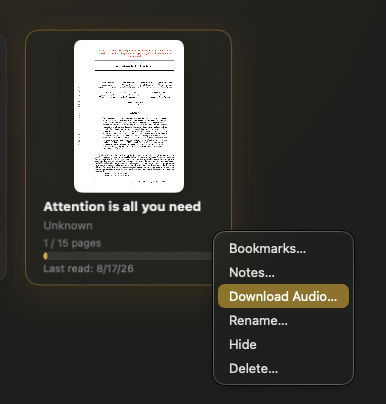
That's it. What you get is a standard WAV audio file of the book's narration - the same lifelike voice you hear in the app, generated entirely on your Mac. Drop it on your phone, queue it in any audio player, keep it as an archive, or send it to a device that has never heard of Unknown.
Why a file, not a lock-in
The audio Unknown creates from your documents is yours. You brought the PDF; your Mac did the narrating; nothing was uploaded to anyone's server. Handing you the resulting file is the honest end of that bargain - listening should not stop at the edge of one app.
Also in 1.23
- Focus sessions respect your calls. A due reading session now waits while your mic, camera, or screen sharing is in use instead of taking over mid-meeting.
- Bookmarks and notes live together. Adding a bookmark opens the notes panel, so a marked spot and your thought about it stay side by side.
- Cleaner narration. Fixed a case where short words in scanned documents could be spelled out letter by letter ("so" read as "S O").
- Tidier deletes. Removing a book also removes its reading goals and any calendar sessions planned for it.
How to update
- In the app: choose Check for Updates from the Unknown menu.
- Fresh install: download the latest version from unknown.ac.
Unknown turns the PDFs and EPUBs you own into interactive audiobooks - narrated by lifelike on-device voices, highlighted in sync, and on a Mac nothing is uploaded.
Download Unknown for Mac →7 days free on yearly and monthly · macOS 14.1 or later
FAQ
What format is the downloaded audio?
A standard WAV file that plays in any audio player - QuickTime, VLC, your phone, your car. Books synced from iCloud may export as M4A instead, which plays just as widely.
Does it include the whole book?
It includes everything narrated so far. Unknown generates audio progressively as you move through a book, so if you have processed 40 of 300 pages, the file covers those 40. Process more pages and download again for a longer file.
Can I listen on my iPhone or another computer?
Yes. It is an ordinary audio file with no protection or account attached - AirDrop it, sync it, or copy it anywhere.
Does downloading cost extra or use the internet?
No. The audio already exists on your Mac; Download Audio simply copies it to the location you choose. Nothing is uploaded or re-generated.