Find Papers: search arXiv and listen to any paper
New in Unknown 1.25: a Find Papers screen that searches arXiv from inside the app. Type a title or a topic, click a result, and the paper becomes an audiobook - narrated on your Mac, highlighted in sync, no browser and no PDF wrangling in between.
Search arXiv without leaving the app
Until now, listening to a research paper in Unknown meant finding it in your browser, downloading the PDF, and dragging it in. Find Papers removes all of that. Click the magnifying-glass-on-document icon in the toolbar, type what you are looking for, and results from arXiv's two million open-access papers appear right there: title, authors, publication date, and the abstract, thirty results per page with paging when a query has more.
Searching is forgiving in the way you want it to be. Paste an exact title and that paper surfaces at the top; type a loose topic like "protein structure prediction" and you get arXiv's relevance ranking to browse.
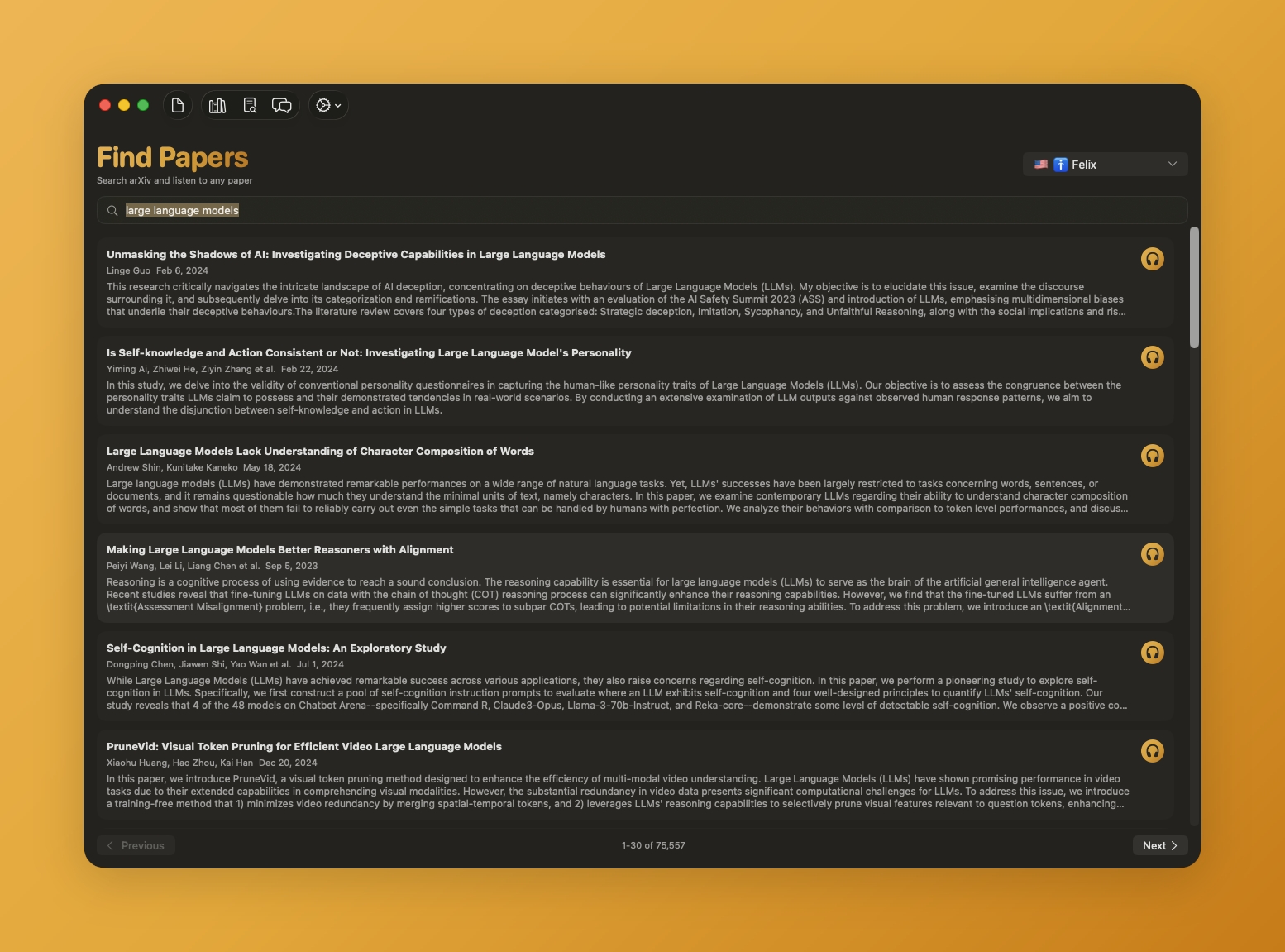
One click from abstract to audiobook
Click a result (or its headphones button) and Unknown downloads the paper and turns it into what it makes of every document: an interactive audiobook. A lifelike voice reads the paper while the text lights up in sync, so you can follow an equation-heavy passage with your eyes or let a survey wash over you on a walk. Processing happens entirely on your Mac - the paper is fetched from arXiv and nothing about your reading goes anywhere.
Pick a voice once, keep it everywhere
A voice picker now sits at the top of the Find Papers screen. Hover over any of the 28 voices to preview it, click to choose, and every paper you open uses it. The choice is remembered across the whole app and across restarts: whichever voice you used last - here or on an upload - is preselected the next time, everywhere.
Also in this update
Check for Updates now lives in the settings gear menu (added in 1.24), so you can grab new versions the moment they ship instead of waiting for the automatic check. Updates install in place and keep your whole library.
Unknown turns the PDFs and EPUBs you own into interactive audiobooks - narrated by lifelike on-device voices, highlighted in sync, and on a Mac nothing is uploaded. Now with arXiv search built in.
Download Unknown for Mac →7 days free on yearly and monthly · macOS 14.1 or later
FAQ
Is Find Papers a separate subscription?
No. Papers you listen to count toward the same page allowance as anything else you open in Unknown - 50 free pages a month, more on a paid plan.
Where do the papers come from?
Directly from arXiv.org, the open-access repository run by Cornell. Unknown searches its public catalog and downloads the paper's official PDF.
Is my reading uploaded anywhere?
No. The paper is downloaded from arXiv, and everything after that - text extraction, narration, syncing - happens on your Mac.
How do I get the update?
Choose Check for Updates from the settings gear menu, or download the latest version from unknown.ac. You are on the new version if About Unknown shows 1.25 or later.