What's new in Unknown 1.27
New in Unknown 1.27: two-column papers are narrated column by column instead of straight across, documents process through a background queue that picks up where it left off, arXiv search got faster, and bug reports can carry a short video.
Two-column papers read column by column
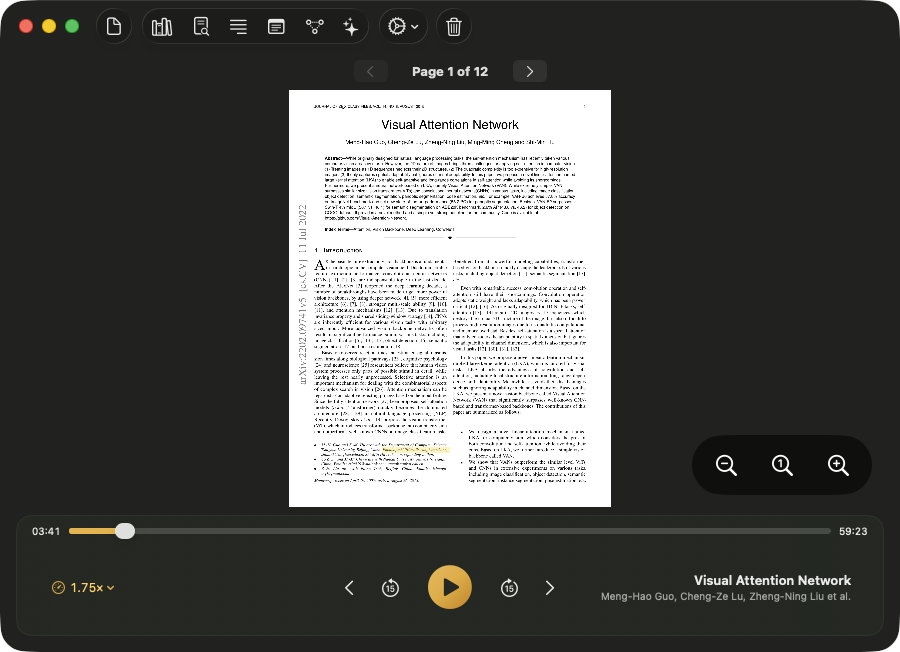
Most research papers - and plenty of textbooks - lay their text out in two columns. Until now, Unknown read those pages the way a scanner sees them: straight across the page, jumping from the middle of a sentence in the left column into an unrelated sentence in the right one.
1.27 detects the column layout during processing and narrates the page the way you would actually read it: down the left column, then down the right. Single-column books are untouched, and pages that mix layouts - a full-width abstract over two-column body text, figures spanning both columns - are handled section by section.
A processing queue that runs in the background
Drop several documents in at once and they now line up in a queue you can see in your library, each processing in turn while you keep reading or listening to something else.
Processing is also durable now. If it gets interrupted - the app quits, the Mac sleeps or shuts down - 1.27 resumes from a checkpoint instead of starting the book over from page one.
Find Papers is faster
The built-in arXiv search returns results noticeably faster and no longer flip-flops between result sets while you type. You can also preview a paper before deciding to narrate it, so a page allowance never goes to the wrong download.
Attach a video to a bug report
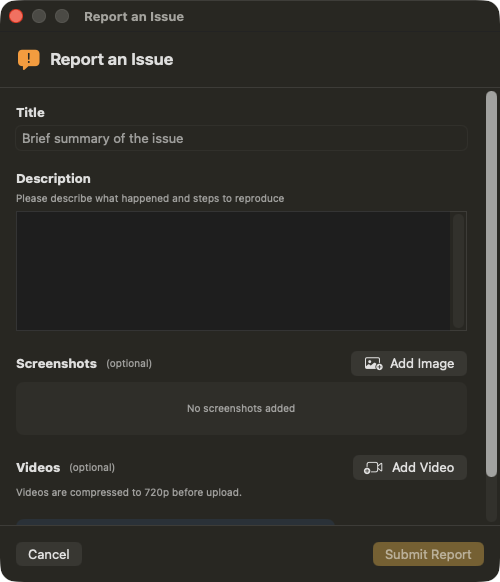
Some bugs are much easier to show than to describe. Report an Issue now accepts short screen recordings alongside screenshots; videos are compressed to 720p on your Mac before upload, so reports stay small and quick to send.
Smaller touches
- A calmer launch. The app opens with a brief logo splash that fades into your library, instead of flashing intermediate screens.
- Zoom that stays put. The zoom level you pick now holds as you move between pages and papers.
- Lighter narration files. Newly generated narration is stored compressed, taking a fraction of the disk space it used to.
- A refreshed sign-in screen with a cleaner layout on both light and dark setups.
How to update
- In the app: choose Check for Updates from the Unknown menu. The update installs in place and keeps your whole library.
- Fresh install: download the latest version from unknown.ac.
You have everything above if About Unknown shows 1.27 or later.
Unknown turns the PDFs and EPUBs you own into interactive audiobooks - narrated by lifelike on-device voices, highlighted in sync, and on a Mac nothing is uploaded.
Download Unknown for Mac →7 days free on yearly and monthly · macOS 14.1 or later
FAQ
Do books already in my library get the new column-aware reading?
Books keep the narration they were processed with, so nothing already in your library changes. To hear a paper in the new column order, process the document again - drop it in like a new book.
Do queued documents process in order?
Yes. Documents process one at a time in the order you added them, and the queue keeps working while you read or listen to something else.
What kind of video can I attach to a report?
Any short screen recording of the problem. Unknown compresses it to 720p on your Mac before it is sent, and only what you attach ever leaves the machine.
Do I need to reinstall the app?
No. Updating in place - via Check for Updates or by dropping the new version into Applications - is enough. Your library and settings carry over.