Clone your voice and hear documents read by you
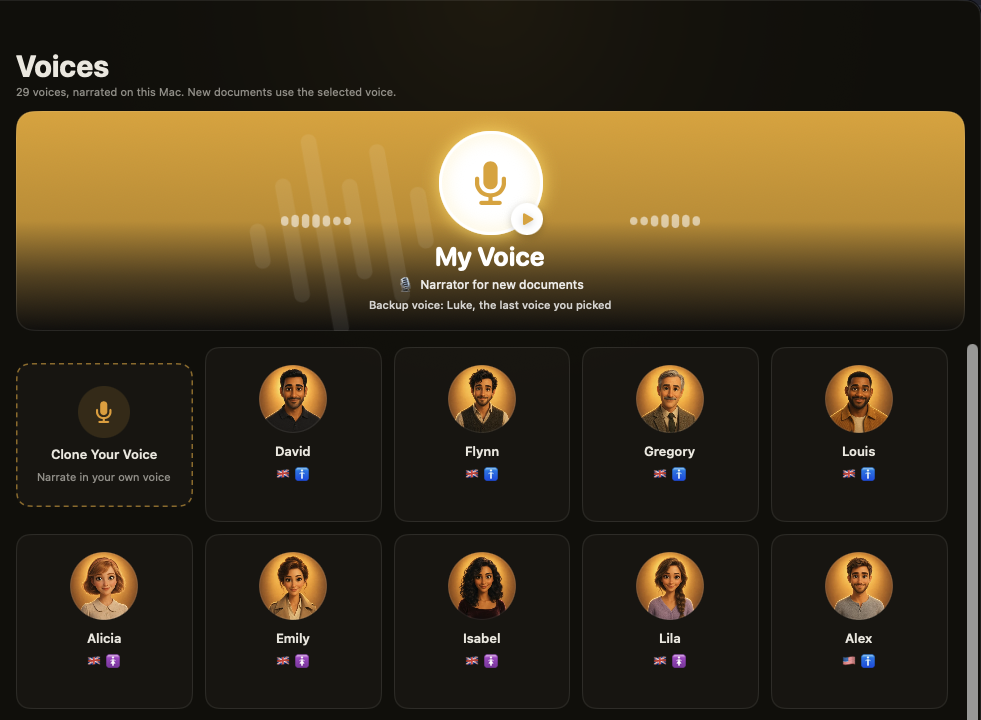
New in Unknown 2.9: your own voice joins the narrators. Read a passage aloud for a few minutes, and Unknown can turn any PDF, EPUB or article into an audiobook spoken by you - with the same word-by-word highlighting as every other voice. The clone is made and used on your Mac only.
Why narrate in your own voice?
Some people want their notes and drafts read back the way they'd say them. Parents want a bedtime story in a voice their kid knows. Teachers and creators want lessons narrated by the person the audience already trusts. And some of us just find it oddly motivating to hear a dense paper explained in a familiar voice. Until now that meant recording hours of audio by hand. In 2.9 it takes a few minutes of reading.
How to clone your voice
- Open Voices and click the Clone Your Voice card at the top of the grid.
- Press Record and read the passage on screen at a natural pace. There are fourteen of them - a road trip, a news bulletin, a recipe, a sports commentary, a bedtime story - so the clone hears questions, numbers, excitement and calm. Click Different Passage any time.
- Record a few takes. Each take keeps its exact transcript, and all of them combine into one voice. Already have clean recordings of yourself? Use Add Audio File... and type what's said in each one.
- Name the voice and click Save Voice. It becomes your narrator right away.
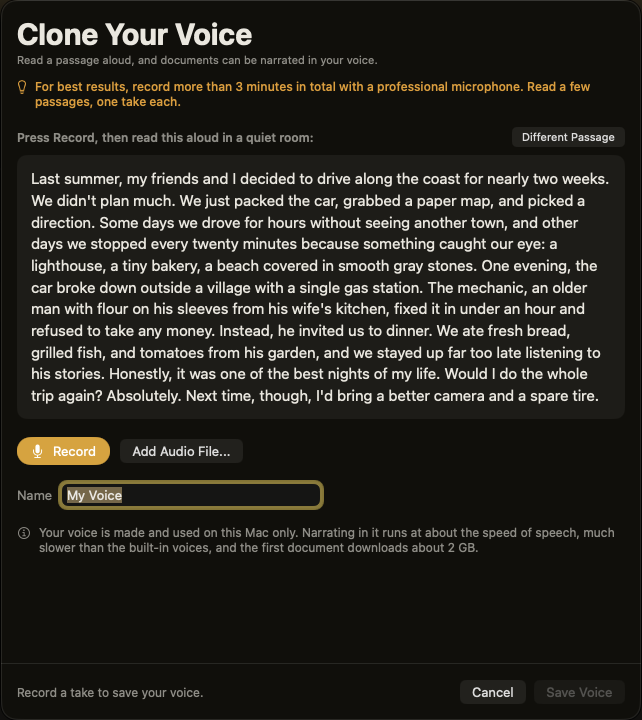
Ten seconds is the minimum, but more is better: aim for three minutes or more in total, in a quiet room, ideally with a good microphone. A cleaner recording makes a cleaner clone.
It still sounds like you on page 300
Long documents are where voice clones usually wander off. Unknown checks every stretch of narration against your recording and quietly redoes any that drift away from your voice, run on with stray pauses or noise, or come out silent. Each piece is matched to your recording's loudness and cleaned of hiss, so a whole book sounds like one sitting. Stray symbols - like a lone bracket from a split footnote marker - are skipped instead of read out.
Private by design
- Made on your Mac. Your recordings and the voice built from them never leave the machine. There's no account voice library and no upload.
- Used on your Mac. Narrating in your voice runs locally too. If a document is processed in the cloud, a built-in voice reads it instead - the app tells you so, and offers to redo it in your voice later.
- Yours to delete. Remove a cloned voice from the Voices screen at any time.
Good to know
- Apple Silicon only. Cloning runs on the Mac's GPU, so it's offered on M-series Macs.
- One-time download. The first document you narrate in your voice downloads about 2 GB of voice data.
- Slower than the built-in voices. Your voice narrates at about the speed of speech, so a long book takes a while to prepare.
- Switch any time. Documents already narrated by a stand-in voice show a Reprocess in Your Voice option in the Library.
How to update
- In the app: Unknown updates itself in the background - or choose Check for Updates from the settings menu to get 2.9 on the spot.
- Fresh install: download the latest version from unknown.ac.
Unknown turns the PDFs and EPUBs you own into interactive audiobooks - narrated by lifelike on-device voices, highlighted in sync, and on a Mac nothing is uploaded.
Download Unknown for Mac →7 days free on yearly and monthly · macOS 14.1 or later
FAQ
How much do I need to record?
At least 10 seconds to save a voice, but three minutes or more across a few passages gives a much closer match.
Is my voice uploaded anywhere?
No. Recording, cloning and narrating all happen on your Mac. When a document has to be processed in the cloud, a built-in voice is used instead and your voice stays put.
Can I use recordings I already have?
Yes. Add Audio File... takes existing recordings of your voice - type the exact words spoken in each so the clone can pair sound with text.
Does it work on Intel Macs?
Voice cloning needs an Apple Silicon Mac. Everything else in Unknown works on Intel Macs as before.
Will reading highlights still follow along?
Yes. Documents narrated in your voice get the same sentence and word highlighting, bookmarks and resume as any other voice.