What's new in Unknown 1.30
New in Unknown 1.30: reading focus sessions open with a spoken recap of where you left off, you stay signed in across app updates, updates install themselves in the background, and deleting a collection can take its books with it.
Focus sessions open with a spoken recap
If you set a reading goal, Unknown books short focus sessions into your calendar and opens a distraction-free listening screen when each one begins. The tricky part of coming back to a book every day or two is remembering where you were - what the argument was building toward, who was talking, what just happened.
1.30 fixes that the way a good narrator would: each session now starts with a short spoken recap of what you listened to last time, in the same voice that reads your book. The recap is prepared quietly after each session finishes, so when the next one starts it plays immediately - no waiting, nothing generated on the spot. When the recap ends, the book picks up right where you left off.
You stay signed in across updates
Until now, updating Unknown could sign you out and ask for your password again - an annoyance that made updates feel more expensive than they are. 1.30 moves the saved session to storage that survives app updates, so signing in is something you do once, not once per release.
Updates install themselves
Unknown now downloads and installs updates automatically in the background instead of interrupting you with a prompt. You keep reading; the new version is simply there the next time the app starts. Your library, narration, and settings always carry over.
Deleting a collection can delete its books
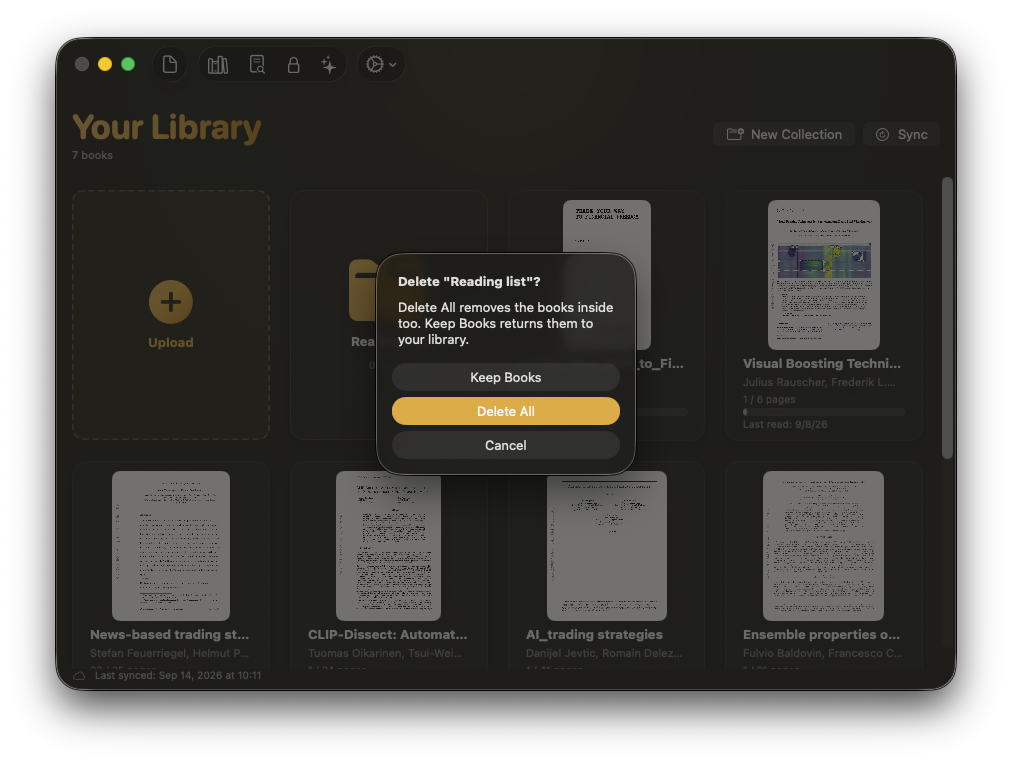
Collections group books into folders in your library. Deleting one used to keep all of its books and just dissolve the folder - the safe choice, but rarely the intended one. 1.30 makes Delete All the default when you delete a collection, removing the folder and the books inside it together, with keeping the books still one click away.
Smaller touches
- A launch that always shows up. A rare macOS quirk could leave the app running with no window after login. 1.30 detects that and reopens the window on its own.
How to update
- In the app: choose Check for Updates from the Unknown menu - or just wait, since 1.30 onward the app updates itself.
- Fresh install: download the latest version from unknown.ac.
You have everything above if About Unknown shows 1.30 or later.
Unknown turns the PDFs and EPUBs you own into interactive audiobooks - narrated by lifelike on-device voices, highlighted in sync, nothing uploaded.
Download Unknown for Mac →Free for 50 pages a month · macOS 14.1 or later
FAQ
Do I need to set anything up to get the spoken recaps?
No. If you have a reading goal with focus sessions, Unknown prepares the recap on its own after each session. The next session simply opens with it.
Will this update sign me out?
No. 1.30 carries your existing session over to the new storage, and from here on updates keep you signed in.
Can I still keep the books when I delete a collection?
Yes. Delete All is the default, but the dialog still offers deleting just the folder so the books return to your library.
Can I turn off automatic updates?
Automatic updates are on so fixes reach you without ceremony. Check for Updates in the Unknown menu still works any time you want to update on the spot.